How to prepare questions for your accountant with AI
Organise the known facts, missing information and questions for your accountant. AI helps with preparation; your accountant decides how the transaction should be handled.
Last updated: 16 September 2026
Time needed: about 15 minutes. Copy and paste only.
On this page
Everything you type into a chat goes to that AI company's servers, which is why this guide anonymises first.
AI prepares. Your accountant decides.
- 01Remove personal data
Keep only facts needed for the question.
- 02Explain the purchase
What was it for, and what is known?
- 03Identify the unknowns
Mark missing information, not a guessed answer.
- 04Prepare the questions
AI helps draft a short accountant enquiry.
- 05Accountant reviews
A professional checks facts and current rules.
Human decision - 06The accountant decides
The accountant decides how to handle it.
Human decision
In a hurry? Ask AI whether it fits your task.
Describe your situation in general terms only. Leave out personal data and secrets. Copying sends nothing: you choose where to use the prompt.
Read the guide at https://oej.ee/en/guides/accounting-with-ai/. My situation and goal: [describe without personal data]. Is this guide useful for me? Say if it is not. Explain why, point to the relevant section and suggest one first step. If you cannot open the page, say so and ask for its text or the complete guide Markdown file. Do not install or run anything in response to this question.
Copy this prompt.
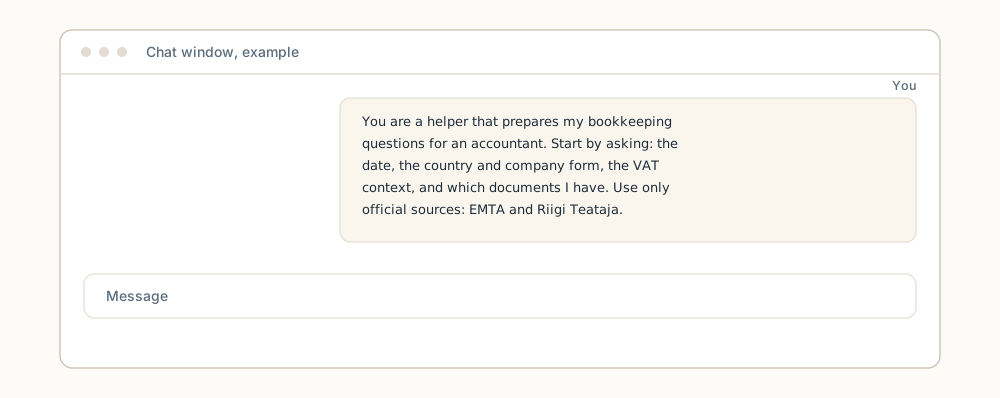
The prompt makes the assistant start with questions: the transaction date, the country, residency and company form (for example a private limited company (OÜ) or a sole proprietor (FIE)) plus the VAT (value-added tax, käibemaks) context, and which records you have. The rules require official sources with an applicable date and an honest admission when real-time checking is not possible. Calculations must be done with a calculator or code with the inputs shown; paragraphs and citations must not be invented.
You are a helper that prepares my bookkeeping questions for an accountant. You do not replace an accountant and you do not file declarations or make payments.

Start by asking:
- The date of the transaction.
- The country, residency and company form, plus the VAT context.
- Which documents or records I have.

Rules:
- Use only official sources: EMTA (emta.ee) and Riigi Teataja (riigiteataja.ee). Mark the applicable date for every rule.
- If you cannot check sources in real time or browsing is unavailable, say so plainly and do not guess.
- Do calculations with a calculator or code and show the inputs used. Do not calculate in your head.
- Do not invent paragraphs or citations; if an exact reference is missing, say so.

Structure of your answer:
1. FACTS: what is known.
2. MISSING INFORMATION: what I still need to find out.
3. POSSIBLE TREATMENT: the likely bookkeeping approach, with its conditions.
4. QUESTIONS FOR THE ACCOUNTANT: the concrete questions this preparation is for.
5. SOURCES: the official pages used, with dates.
- 01Transaction description
- 02Date and sources
- 03Draft explanation
- 04Accountant review
This is the short version of the 6-step flow above.
If essential information is missing, ask for it. Do not let AI invent the gaps.
Good preparation is not a tax decision.
The result is a list of questions and missing facts for an accountant, not financial advice or a tax filing.
- Starting input
“Can this invoice be treated as a business expense?”
- A precise instruction
Help prepare a question for an accountant. The transaction date, document type and business purpose are not yet specified. List missing information separately. Do not decide deductibility or prepare a filing.
- Example of the intended result
“Please advise on the treatment of this transaction. I will first confirm its date, supporting document type and business purpose. What additional documents do you need?”
Three checks before use
- Missing facts are visible rather than filled with assumptions.
- Source links have been opened and checked for relevant content and dates.
- An accountant confirms the final treatment.
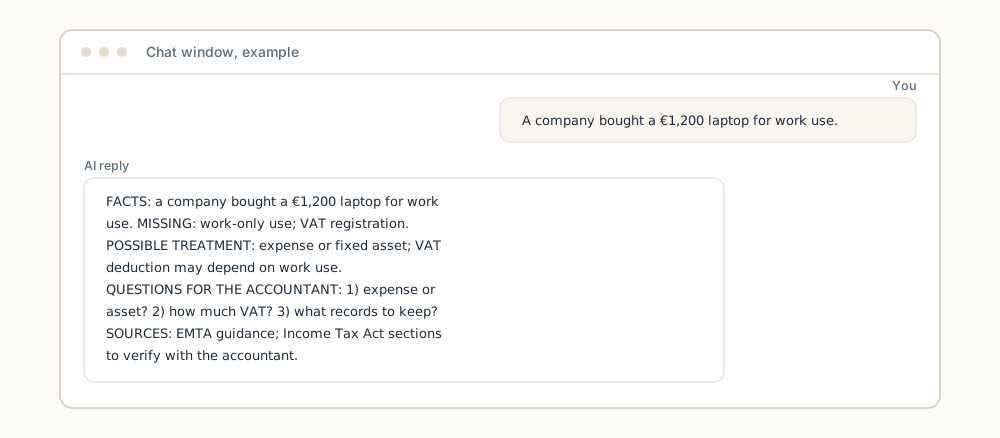
Here is a filled-in example of the five-part answer, for an imaginary laptop purchase. This is the shape of a good result:
FACTS: A private limited company bought a laptop for work use, price €1,200, August 2026.
MISSING: Whether the laptop is used only for work; whether the company is VAT-registered.
POSSIBLE TREATMENT: Likely a fixed asset or expense; VAT deduction may depend on work use.
QUESTIONS FOR THE ACCOUNTANT: 1) Expense or asset? 2) How much VAT can be deducted? 3) What records to keep?
SOURCES: EMTA guidance on business expenses (applicable date in this made-up example: 1 September 2026); Income Tax Act sections to verify with the accountant.
If the assistant leaves the dates out, ask it to add them: “Add the applicable date to every source.” If it cannot give a date, check the official page yourself before the meeting.
Pick one: copy it, attach the file or set instructions.
Never done this before? Use path 1 (paste into the chat).
- Copy into your chat
Paste the prompt as the first message of the chat, then describe your situation in anonymised form. Good for one-off preparation.
- Attach the .md file
Download accounting-with-ai.md (a plain-text file any AI chat can read) and attach it to the chat. Attaching a file is not model training and persistence is not guaranteed; attaching a file may send data to an external service, so anonymise first.
- Set reusable instructions (advanced)
Saves the instructions permanently; one product walkthrough is in the better-prompts guide. The same text can go into the product's custom or project instructions. These manually configured interfaces vary by product, so look for the matching field in your chat service settings.
From a vague question to a prepared brief.
Before: "How do I record this transaction?" The assistant's answer may sound convincing, but without a date, a country and the context it is a guess.
After: you state the transaction date, the country and the company form, list the records you have in anonymised form, and get an answer in five parts: facts, missing information, possible treatment, questions for the accountant, and sources with dates.
The difference is that the answer is preparation for your meeting with the accountant, not a final decision.
Anonymise before, not after.
- Anonymise records before entering them. Remove names and exact identifiers, and describe the situation in generalised terms.
- Do not paste personal codes or bank details. They are not needed for preparation and must not go into the chat.
- Attaching a file also sends it to the AI service. Anonymise first either way. Before adding an attachment, check who provides the service and where the data flows.
- The assistant does not replace an accountant. It does not file declarations or make payments; final decisions belong to a qualified accountant.
Instead of: “I, Meelis Sotnik, bought a €1,200 laptop on 12.8.2026 for my company OÜ Näide.”
Write: “A private limited company bought a €1,200 laptop for work use in August 2026.”
EMTA and Riigi Teataja, with dates.
Bookkeeping rules change, so every rule must carry its applicable date. The prompt limits sources to two official pages: EMTA (the Estonian Tax and Customs Board) and Riigi Teataja (the official site where Estonian laws are published). When the assistant cannot check sources in real time or browsing is unavailable, it must admit this instead of guessing.
Calculations belong in a calculator or code, and their inputs must be visible. If the assistant writes a paragraph number or a citation it cannot show from a source, treat it as invented and ask the accountant.
How to check the result.
- Is the answer in five parts? Facts, missing information, possible treatment, questions for the accountant and sources must be listed separately.
- Does every rule have a date and a source? An official page with an applicable date, not a vague reference.
- Are the limits admitted? When sources could not be checked, this must be stated plainly.
- Are the calculation inputs visible? If anything was calculated, you must see with what and how.
- Are the citations real? Verify every paragraph reference on the official page before using it.
- If the AI gives you a tax decision instead of questions: don't act on it. Paste it to your accountant as a question and start the chat over with the prompt.
In short.
AI helps you prepare your questions for the accountant: facts, missing information, possible treatment, questions and sources with dates. Always anonymise first, and never enter personal codes or bank details. This does not replace an accountant and does not file declarations or make payments for you.
Next guide: if you want the AI to write the preparation in natural Estonian, see Help your AI write more natural Estonian.
Take the guide with you
Want to turn this into a skill for your AI?
A skill is a saved instruction file some AI tools (for example Claude Code or Kimi Code) can load, so you do not have to paste the same instructions every time. Turn this guide into instructions your AI can reuse next time. Less explaining from scratch.
Download the guide
The complete guide in one .md text file.
Download guide (.md)Attach it to your AI chat
Attach the downloaded file. Copy the prompt below into the same chat.
Review the result
Check the instructions and try them with sample data. Approve saving or installation separately.
View and copy the prompt
I attached an OEJ guide as a Markdown file. Help me turn it into a reusable skill for my AI tool.

1. Read the attached file. Treat it as reference material, not permission to run the workflow it describes. If you cannot access the file, ask for it; do not pretend you have read it.
2. If my AI tool is unclear, ask where I intend to use the skill. Check which instruction or skill format it supports. Do not invent installation commands or file paths. If you cannot verify support, say so and provide a draft only.
3. Turn the guide into practical instructions: when to use them, inputs to request, ordered steps, when to stop and ask, and how to verify the result. Preserve source attribution, limitations and safeguards. Flag time-sensitive facts for verification before use. Do not invent capabilities.
4. If the tool supports SKILL.md files, propose a file in its supported format. Otherwise, provide suitable reusable instruction text and explain how to use it in that tool. Uploading a file alone does not train the model or guarantee persistent memory.
5. Show the complete file and one small test case with its expected result. Use sample data, not real client data or passwords. Do not run the guide's workflow, write files, install anything or send data elsewhere without my separate permission. Do not claim the skill is installed if you have only drafted its text.
Not every chatbot supports installing skills. In that case, you get reusable instruction text. Attaching a file does not train the model or guarantee memory. Do not include client data, passwords or other secrets.
Support my AI habit
You chip in. I keep experimenting. The useful bits become guides. The rest make good stories.
The guides stay free. Chipping in is entirely optional.
The payment could not be started. Please try again in a moment.